Plannelink

How Plannelink Works

In brief

"Plannelink's 'Dead Man's Switch' system monitors your inactivity and automatically delivers your encrypted inventory to your beneficiaries only when you no longer respond to periodic checks."

A security system based on Zero-Knowledge encryption and automatic Dead Man's Switch that guarantees digital continuity to your family without exposing passwords or credentials.

How does Plannelink work?

Plannelink solves a critical problem: if something happens to you tomorrow, do your loved ones know where to look? Many people have assets distributed across dozens of platforms (brokers, banks, crypto exchanges, hardware wallets, policies, domains), but no centralized system to document them.

Our approach is simple but powerful:

  1. You create an encrypted inventory of WHERE your assets are located (e.g., "Account at IBKR", "Ledger in safe", "Generali Policy #12345")
  2. You designate beneficiaries (spouse, children, trusted people) who will receive the map
  3. The system monitors your activity through periodic logins and verification emails
  4. In case of prolonged inactivity, beneficiaries automatically receive instructions to recover assets legitimately

Key difference: We don't save passwords or credentials. Only the inventory of WHERE to look. This eliminates legal risks and ensures safe recovery compliant with estate regulations.

Explainer video: how Plannelink works to protect your digital legacy with Zero-Knowledge encryption

How Plannelink Works

Watch the 90-second explainer video

What are the main steps?

1
2
3
4
01

Create Your Digital Vault

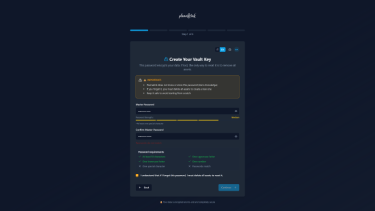
Sign up on Plannelink and set your Master Password. This password is the only key that can decrypt your data: we don't save it, we don't know it, we can't recover it.

We use Zero-Knowledge encryption: your data is encrypted on your device before being sent to our servers. Not even we can read it. It's technically impossible for anyone (including us, governments, hackers) to access your data without your Master Password.

Plannelink Master Password creation interface with password strength indicator and Zero-Knowledge encryption
Learn how Zero-Knowledge encryption works →
02

Map Your Assets

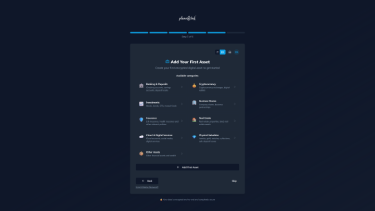
List all your digital assets: bank accounts, brokers, crypto exchanges, hardware wallets, insurance policies, domains, cloud services, and any other important digital property.

For each asset, enter:

  • WHERE it's located (e.g., "Account at IBKR", "Ledger Nano X wallet")
  • HOW to access it (e.g., "Username: john.doe", "Seed phrase in bank safe")
  • Notes for heirs (e.g., "Contact accountant Mr. Smith for estate")

Important: Don't enter complete passwords. Only indicate where to find them (e.g., "Password in 1Password manager, family vault").

Plannelink dashboard showing digital asset inventory: bank accounts, cryptocurrencies, insurance policies, and hardware wallets
See all supported assets (50+ categories) →
03

Set Your Beneficiaries

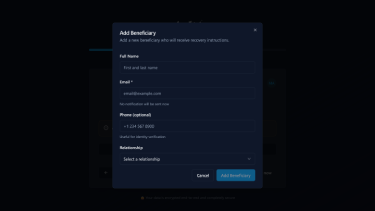
Designate your most trusted people who will receive the complete map of your assets: spouse, children, parents, lawyer, accountant.

You can:

  • Designate multiple beneficiaries (the free plan supports 1 beneficiary, the Pro plan will support more)
  • Specify what each receives (e.g., "Spouse receives everything", "Children receive only crypto")
  • Add personalized instructions for each beneficiary

Beneficiaries will receive an encrypted email with instructions to access the map. Only they, with the key you'll provide (e.g., a secret phrase shared with family), can decrypt it.

Plannelink beneficiaries management interface with heir list and asset assignment for digital legacy
04

Activate Automatic Monitoring

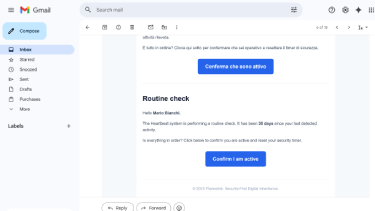
The Dead Man's Switch system monitors your activity through periodic logins. If you don't log in for an extended period, you receive verification emails ("Proof of Life").

Automatic timeline (configurable in Pro plan):

Day 0
Last login recorded
Day 30
First verification email ("Are you still active?")
Day 37
Second reminder (no response or login)
Day 40
Final urgent email
Day 41
Beneficiaries are notified and receive instructions

You can stop the procedure at any time simply by logging in or responding to a verification email.

Plannelink Proof of Life verification email from Dead Man's Switch system for automatic digital legacy monitoring

What makes Plannelink secure?

Plannelink's security is based on three fundamental pillars:

1. Zero-Knowledge Encryption

Your data is encrypted on your device before being sent to our servers. The encryption key is derived from your Master Password, which never leaves your browser. Not even we can read your data.

2. No Passwords Stored

Unlike password managers, Plannelink doesn't store access credentials. We only save the inventory of WHERE your assets are located. This eliminates password theft risk and ensures legal compliance.

3. Complete Portability

You can export all your data at any time in JSON or PDF format, encrypted or in clear text (your choice). No vendor lock-in. Your data is yours, always.

Read the complete technical security whitepaper →

How are beneficiaries notified?

When the Dead Man's Switch system detects prolonged inactivity and completes the verification procedure, beneficiaries receive a notification email with:

  • Confirmation that you've been inactive for the configured period
  • Secure link to access the encrypted map of your assets
  • Instructions on how to decrypt the map (using the key you shared with them)
  • The personalized instructions you provided for each asset during inventory

Privacy guaranteed: Beneficiaries receive no notification until the system detects inactivity. They won't even know they've been designated until that moment (unless you tell them).

Total control: You can modify, add, or remove beneficiaries at any time. You can also test the system by sending a test notification.

Can I modify or export my data?

Yes, always. Plannelink is designed to give you total control over your data:

Real-time editing

You can update, modify, or delete any asset, beneficiary, or instruction at any time. Changes are immediate and synced across all your devices.

Complete export

You can export the entire map in two formats, encrypted or in clear text (your choice):

  • JSON: Machine-readable format for backup or migration
  • PDF: Human-readable format for printing or physical archiving

No vendor lock-in

Your data is yours. If you decide to stop using Plannelink, you can download everything and delete your account. No penalty, no friction.

Learn more about export and portability →

Frequently Asked Questions

Quick answers to common questions

How long does it take to set up Plannelink?

Initial setup takes about 3-5 minutes (registration + Master Password). Mapping your assets depends on how many you have: for 5 assets it takes about 10-15 minutes. You can add assets gradually over time (the free plan supports up to 5 assets).

What happens if I forget my Master Password?

We cannot recover it. The Master Password is the only key to decrypt your data. If you forget it, the only way to proceed is to delete all assets, after which you can set a new Master Password and re-inventory your assets. To avoid this scenario, we recommend: (1) Saving it in a secure password manager, (2) Writing it on paper and storing in a safe, (3) Sharing it with a highly trusted person.

Can I use Plannelink for my business?

Yes. Many entrepreneurs use Plannelink to document critical business assets (domains, cloud accounts, software licenses, business wallets). The Pro plan (coming soon) will include specific features for teams and businesses.

Is it really free forever?

Yes. The basic plan includes all essential features and will remain free forever. In the future we'll offer a Pro plan with advanced features (more beneficiaries, redundant backups, configurable timings), but the core will always remain free.

Where is my data stored?

Encrypted data is stored on secure servers in Europe (GDPR compliant). We use Supabase (AWS infrastructure) with automatic daily backups. Remember: data is end-to-end encrypted, so not even the hosting provider can read it.

Ready to protect your digital legacy?

Start mapping your assets in 3 minutes. Free forever, no credit card required.

Zero-Knowledge Full export GDPR compliant