
Plannelink

Data Export & Portability

In brief

"Data portability is a fundamental right. With Plannelink, you can export your entire asset inventory at any time in encrypted PDF or JSON format, ensuring no vendor lock-in."

Your data is yours, always. Our Zero-Knowledge architecture ensures that you are the only one who can decide how and when to export your information.

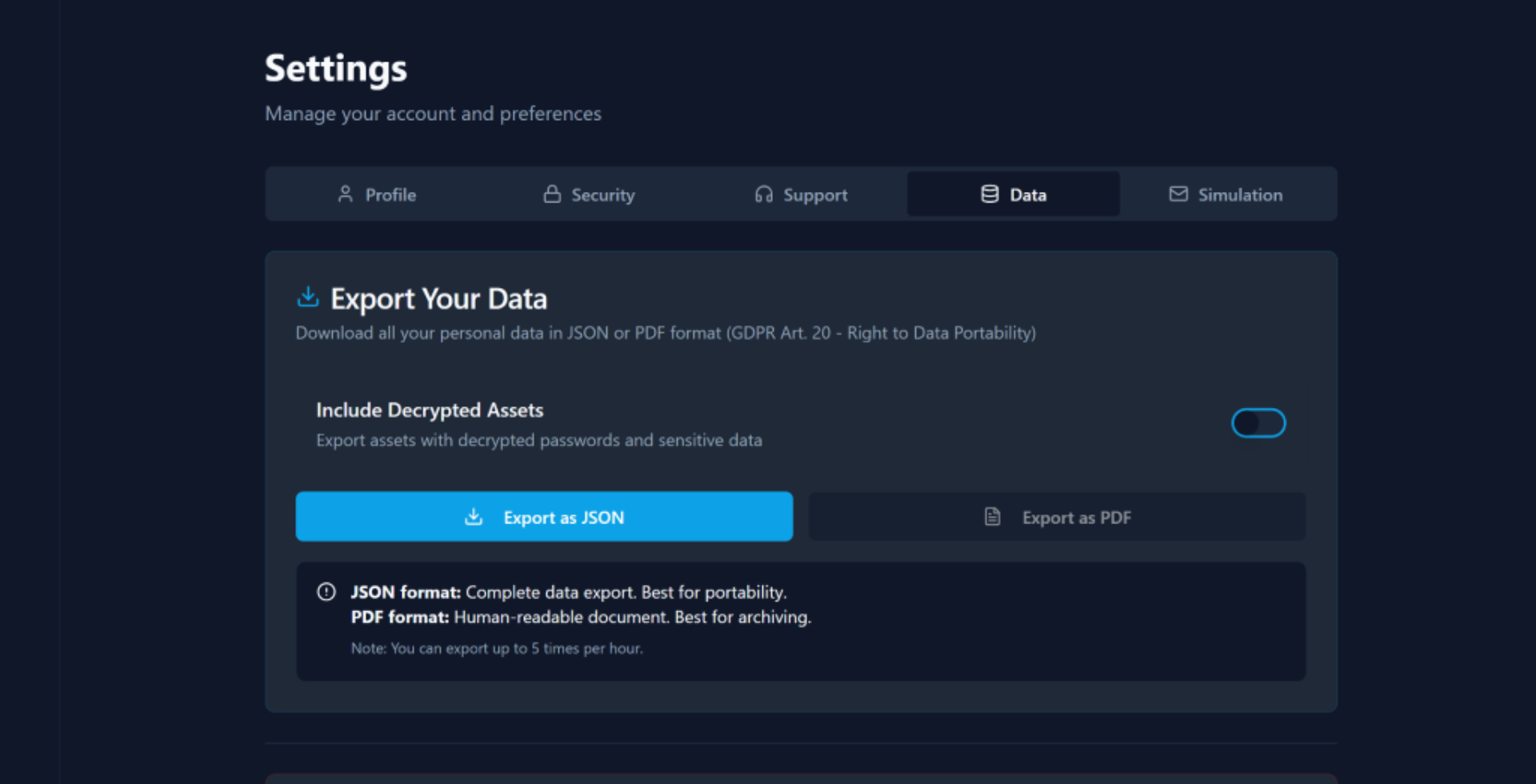
Plannelink export interface: JSON and PDF options, encrypted and clear for full data portability without vendor lock-in

Why is portability fundamental?

Entrusting the map of your assets to a digital platform requires trust. One of the primary fears is vendor lock-in: the fear of being trapped in a service that makes it difficult or expensive to recover your data.

At Plannelink, we consider portability a pillar of security. If a user is not free to leave with their data, they are not truly safe. That's why we guarantee:

  • Immediate access: Exporting does not require approvals or waiting times.
  • Zero costs: Exporting data is free for all plans, including the Beta version.
  • Open standards: We use universal formats (JSON and PDF) compatible with any other system.
  • Full GDPR compliance: The "right to portability" is integrated into the heart of the application.

What export does NOT include

  • We don't export complete passwords: Only the inventory of WHERE your assets are located, not access credentials, for security reasons and our Zero-Knowledge architecture.
  • We don't transfer funds: Export is an informational map, not an automatic money or physical asset transfer system.
  • It doesn't replace a will: It's a complementary tool for digital continuity, not a legally binding document.

What export formats are available?

We offer several options to cover every need, from digital backup to physical storage:

Format Use Case Encryption Machine Readable
🔒 JSON (encrypted) Secure backup for local storage ✅ AES-256 ✅ Machine-readable
📄 JSON (clear) Migration to other systems or verification ❌ No ✅ Machine-readable
🔐 PDF (encrypted) Secure bilingual Emergency Kit (digital) ✅ AES-256 ❌ Human-only
🖨️ PDF (clear) Physical Emergency Kit for safe or notary ❌ No ❌ Human-only

Not sure which format to choose?

🔒 Secure Backup

Keep an encrypted copy on your device or personal cloud.

→ Encrypted JSON

🖨️ Physical Kit

Print and keep in a safe or with a notary/trustee.

→ Clear PDF

📤 Migration

Import data into another software or personal spreadsheet.

→ Clear JSON

Want to test the export now?

Create a basic inventory and try the easy export process immediately.

Can I export encrypted data?

Absolutely yes. Many backup services export data in readable format, which represents a risk if the file is intercepted or lost. Plannelink allows you to choose:

🔒 Encrypted Export

You download files protected by your Master Password. Even if someone gained possession of the file, they could not read the data without your secret key.

📄 Clear Export

The system decrypts the data locally in your browser (using your Master Password) and generates a readable file. Useful for migrations or creating a physical copy.

Zero-Knowledge Security Details →

Use Case Scenarios

Local Backup

Periodically download an encrypted JSON file and keep it on an external drive or in a separate cloud for maximum redundancy.

The Physical Emergency Kit

Generate the PDF in clear, print it, and keep it in a physical safe along with other testamentary documents.

Migration

Use the JSON format to import your data into another inheritance management system or custom spreadsheet.

Plan Verification

Download the export before making major changes to have a safe and verifiable restoration point for your inventory.

Haven't started mapping yet?

The export downloads the complete inventory you created by mapping your assets. Learn how our smart mapping system works.

Go to the full "How It Works" guide →

Frequently Asked Questions

Everything you need to know about data portability

How long does it take to export data from Plannelink?
Exporting is instantaneous. Once the procedure is started, the system generates the JSON or PDF file in a few seconds, ready for immediate download.
Can I export only some assets or do I have to download the whole inventory?
Currently, the export generates a complete package of your inventory to ensure you have a full backup copy. In the Pro plan, it will be possible to select specific assets or categories.
Does the export also include beneficiary details?
Yes, the export includes the list of designated beneficiaries, their contact details, and any specific instructions you have associated with each of them.
Can I re-import exported data into a new Plannelink account?
This functionality is not yet available for free accounts but is planned as an advanced feature for Pro accounts. Currently, the JSON format is designed to be easily readable or re-imported in the future.
What exactly does the export file contain?
The file contains the complete asset inventory (names, locations, recovery instructions), the list of beneficiaries with their contact details, activity logs (heartbeat) certifying account status, and the technical metadata required for GDPR compliance and data portability.
Can I export data without deleting my account?
Absolutely yes. Export is always available regardless of your account status. You can download your data at any time, even multiple times, without any limitation.
How often should I make a local backup?
We recommend exporting data every 3-6 months or after important changes to your inventory (adding new assets, changing beneficiaries, updating instructions). This ensures your local backup is always aligned.
Is the JSON file compatible with other legacy management systems?
Yes, we use an open JSON standard easily readable by any system. The format is documented and designed for maximum interoperability, allowing you to import data into spreadsheets, databases, or other asset management software.

Your data, your freedom.

Create your inventory and try export today. No commitments, no credit card. Only the security of full control.

Unlimited exports always Standard Open JSON/PDF Zero Vendor Lock-in